MCA welcomes the cemetery organisation in their attempt to digitise their processes and create a better legacy for future generations to utilise and appreciate.
For new cemeteries to be loaded onto the muslimgraves.com app at https://app.muslimgraves.com/cemeteries, we recommend they follow the guidelines and pay close attention to the prerequisites.
In summary the take-on project consists of 6 phases, with the last phase being the training of the staff then the activation of the App. The App follows a strict workflow process with intermediate checks before the next step.
THE PROJECT
The following phases each have set prerequisites that the cemetery organisation must adhere to that will facilitate a smooth take-on and speedy activation of the App. Each phase tabulates the action and the resource.
Infrastructure Audit (MCA)
GIS Project (via Parker Survey Company)
Bulk Document Scanning (via the Document Warehouse Company)
Matching Data (MCA)
Business Processes (MCA)
The App (MCA)
Phase 1: Infrastructure Audit (MCA)
Visit the cemetery and do an audit of Wi-Fi infrastructure, facilities and technology hardware and software.
Prerequisites:
Safe location/office to install equipment
Location/office to have electricity available
Approximate square metres of erf
Access to staff and supervisor
Phase 2: GIS Project (Parker Survey Company)
Optional. The Parker Survey Company will record all the visible gravestones with accurate GPS equipment, then have the data captured into a spreadsheet for upload.
Note: the App can do the above using the Capture function.
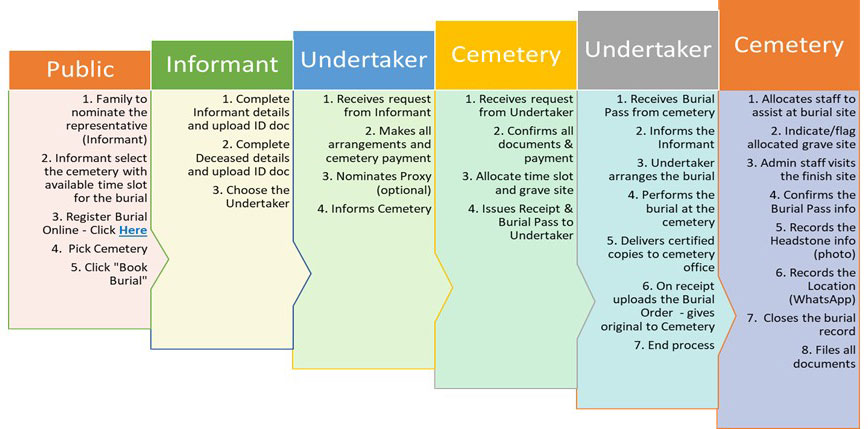
The MCA App contains functionality for a complete workflow (the FULL version) or limited workflow (the LITE version). The cemetery can choose which version to implement.
MCA App features: FULL version
Search to see if there are holes available
Book a hole
Select registered undertaker
ID documentation uploaded
Payments
Burial workflow process
Home Affairs documentation uploaded
Confirm / cancel grave
Attach headstone photograph and GPS
Search for family member
Obtaining copies of files or documentation
All role players are registered on the App
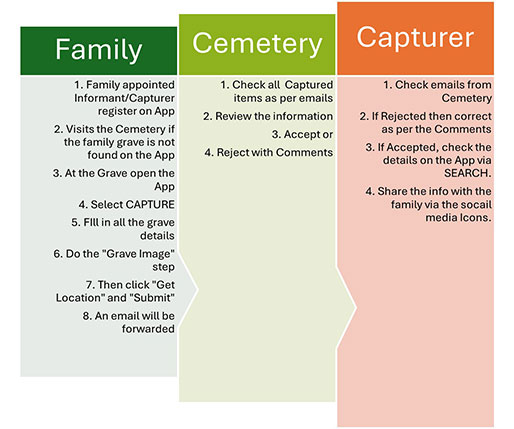
MCA App features: LITE version
Search to see if the grave is listed
Capture and photograph the grave with headstone
Select and capture the GPS
Burial documentation can be uploaded and linked to grave*
Approval process completed before information is displayed on the App
Search for family member
Obtaining copies of files or documentation*
All role players are registered on the App
* Documentation subject to being scanned and uploaded beforehand.
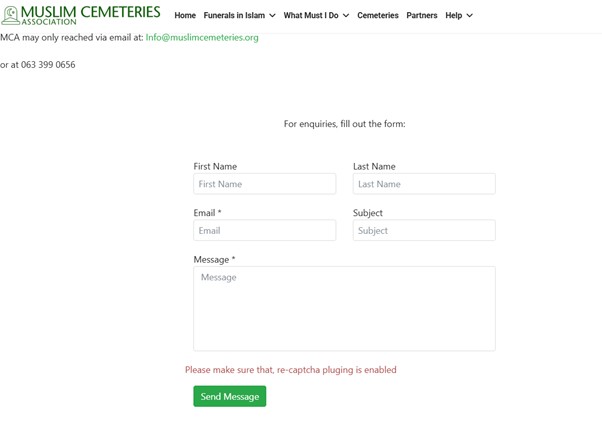
MCA App features: FULL version workflow diagram.MCA App features: LITE version workflow diagram.How to join MCA: registration, contact and implementation meeting path.
How to join MCA
Visit this new cemeteries page for prerequisites and forms.
Download and complete the appropriate registration form and send it with attachments by email: